DNS Record Types Explained

In this article we will get to know about DNS, but first a question.
Do you know how a browser exactly knows where the website resides when we search for any domain in the search bar?
The answer is DNS. So let’s know more about DNS.
What is DNS?
DNS stands for domain name system. In simple terms, DNS is like an address book of domains.
DNS maps domains to IP addresses of devices where the website resides.
Why are DNS records needed?
DNS records are instructions that provide information about a domain, like on which IP address the domain is hosted. And these records are needed because without them a browser can never know where it can interact with a website. over the internet.
There are multiple DNS records. Some we will see later in the article.
NS Record
NS stands for name server record. This record basically tells from where the browser can start the search for the IP where the website is. This means an NS record will tell the IP address of the DNS server from where the browser can start the search for the IP address of the website.
A Record
The A record will tell the IP where the website is. It means the exact address of the website.
AAAA Record
This record is the same as an A record but with a slight difference. An A record is for IPv4 addresses, and an AAAA record is for IPv6 addresses.
CNAME Record
CNAME stands for Canonical Name Record. In simple terms, this record maps a domain to a different domain. Let’s understand it with an example.
Suppose you have your domain, but you are writing blogs on Hashnode. And Hashnode provides functionality to use your own domain instead of the ones they give. So that's what you will do. You will create a CNAME record to map your domain to the Hashnode domain.
MX Record
MX stands for Mail Exchange. Suppose the domain is chaicode.com and there is a mail ID with this domain hitesh@chaicode.com. Now you send an email to hitesh@chaicode.com. But where will Mr. Hitesh receive the email? An MX record exactly tells where the email sent on hitesh@chaicode.com will be received.
TXT Record
TXT stands for Text. This record lets you store some human-readable or machine-readable text for your domain. TXT records are generally used for one of the most important use cases: domain ownership verification.
Domain Ownership Verification → Whenever you register your domain, then services like Google verify that you are the one who actually owns the domain. But how will it be done? Correct, using the TXT record. Google will ask you to add a specific TXT record in the domain’s DNS setting, which might look like google-site-verification=xxxxxx. Once added, the service can check that this record is present in the domain’s DNS setting and that you are the owner.
How do all DNS records work together for one website?
Now that we know about DNS records, let’s see how all these records work together.
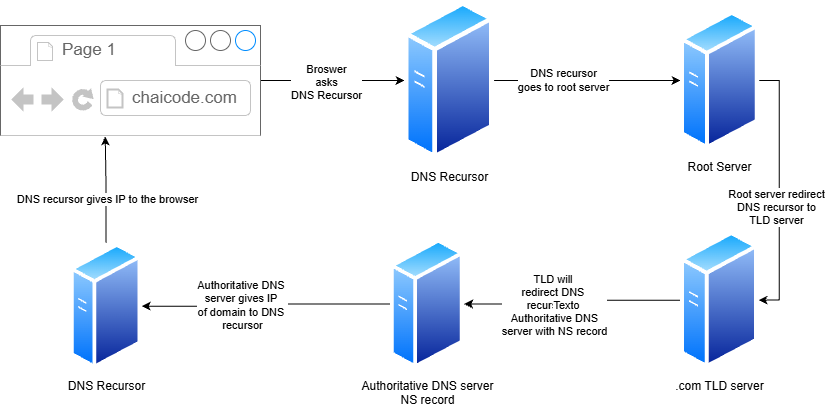
Suppose you want to search for a website chaicode.com. So you will enter this domain in a browser. But the browser wants the IP address on which the website is hosted. So the browser will ask DNS Recursor to go and find the IP address. The DNS recursor will first go to the root server in search of IP. The root server will redirect the DNS recursor to the correct TLD server (top-level domain server). Now when the DNS recursor goes to the TLD server, the TLD will check for the correct authoritative name server and redirect the DNS recursor to the authoritative DNS server, as this server holds the DNS records. Now the DNS recursor will ask the authoritative DNS server for the IP address, and it will look for the A record to find the IP and will provide the IP address to the DNS recursor, and the DNS recursor will provide the IP to the browser.
Hope you all liked the article
Thank You!


