Git for Beginners: Basics and Essential Commands

What is Git?
Git is a tool developed in the year 2005 by Linus Torvalds as a side project to manage the code base of Linux. It’s a tool that is used to keep track of changes done in project files. It keeps track of every little change done in project files, but only whenever a developer asks to do so.
Why is Git used?
Git is used in software development to manage and track the changes done in project files. There are many other version control systems in the market, but Git has become so popular due to its flexibility, speed, and distributed nature. To use Git, there are some common commands that need to be used in the terminal after installing it on the machine.
Git basics and core terminologies
Repository: The directory/folder that contains the project files tracked by Git.
Staging: It’s an area where all the changes are gathered together before committing.
Commit: It means to save the staged changes in the repository.
Branch: A branch is a copy of the same code base from where it is created. Developers can do the changes in that branch without affecting the main code. It’s just like a parallel universe.
Checkout: It’s a process that runs by a command to switch between different branches.
Common Git commands
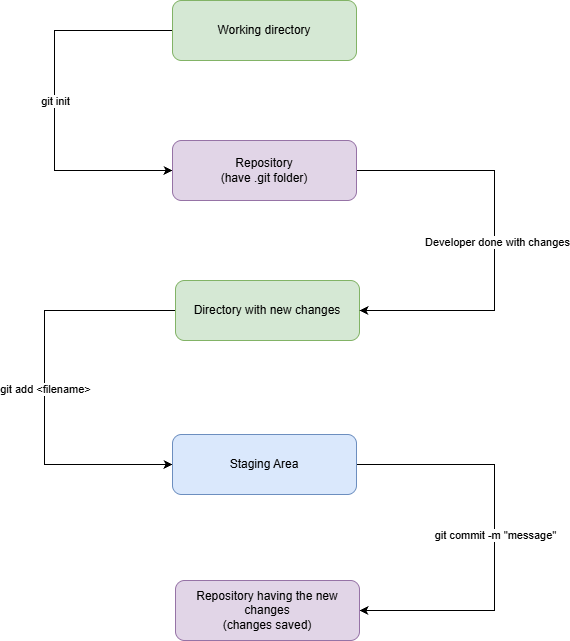
git init: Command is used to turn a normal project directory into a Git repository where Git can keep track of changes inside the .git folder.git add <filename>: Command is used to tell Git to add a file to the staging area.git add .: This command is used to add all the files in the staging area.git commit -m “mesage”: The command tells Git to take the snapshot of changes done in files present in the staging area.git commit -am “message”: This command is the combination of the git add and git commit commands. This command will add the files in the staging area and then commit the changes.git reset <filename>: This command is used to remove a file from the staging area.git status: This command shows modified files in the repository.git log: The command shows the commit history.
Common Git process
Hope you all liked the article
Thank You!


